
Description
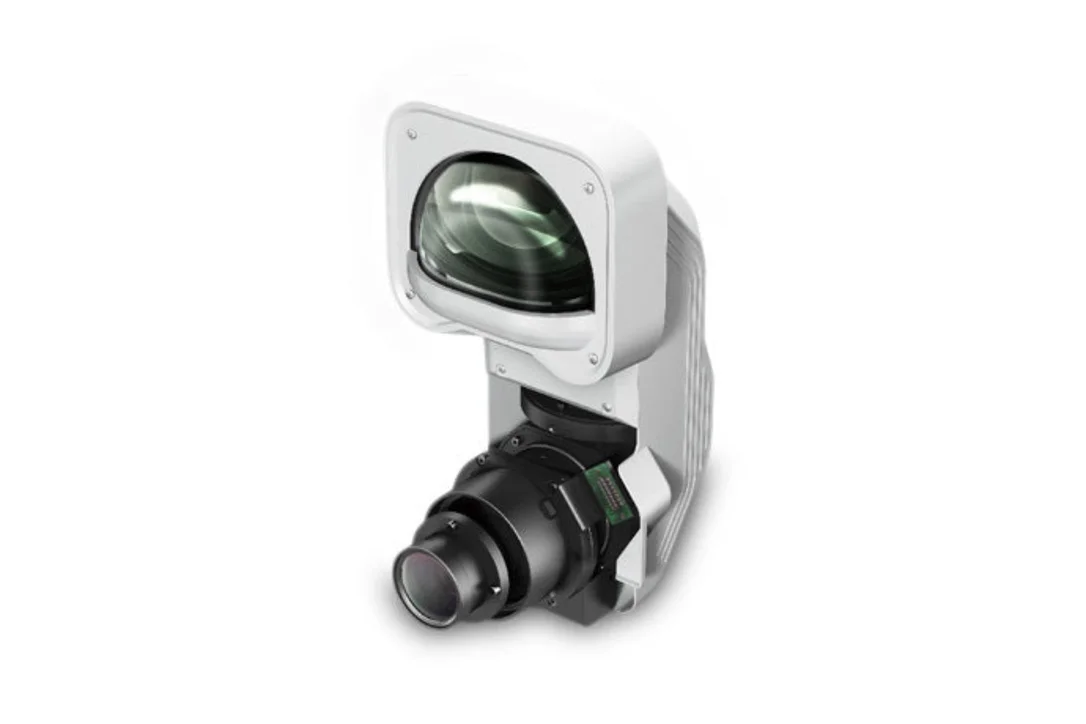
Epson ELPLX01W Ultra Short-throw Lens – V12H004Y01
Project supersized images using the ELPLX01W ultra short-throw lens with select Epson Pro L and Pro G Series projectors1, up to 8,000 lumens. Featuring a 0.35 throw ratio and zero offset, this versatile lens is the ideal solution for installation in narrow spaces and rear-projection applications. Plus, its wide lens shift range offers even more flexibility when needed.
*]:pointer-events-auto [content-visibility:auto] supports-[content-visibility:auto]:[contain-intrinsic-size:auto_100lvh] scroll-mt-[calc(var(–header-height)+min(200px,max(70px,20svh)))]“ dir=“auto“ data-turn-id=“request-WEB:7ead2a83-b233-4dd8-8451-14548243c5a5-68″ data-testid=“conversation-turn-130″ data-scroll-anchor=“true“ data-turn=“assistant“>
What Our Experts Think
-
Space-saving powerhouse: With its 0.35 throw ratio, this lens delivers massive images from extremely short distances—perfect for tight installations.
-
Zero offset: Makes placement simpler, especially for rear-projection setups or environments where vertical space is limited.
-
High compatibility: Works with select Epson Pro L and Pro G Series projectors up to 8,000 lumens, giving installers plenty of flexibility.
-
Exceptional alignment control: Its wide lens shift range makes it easy to fine-tune image positioning without moving the projector.
-
Ideal for pro AV environments: Great for museums, corporate displays, simulators, staging, and immersive rooms.
Q&A
Q: What is the throw ratio?
A: 0.35, meaning very large images can be produced even when the projector is positioned close to the screen.
Q: Which projectors does this lens support?
A: Select Epson Pro L and Pro G Series models (up to 8,000 lumens).
Q: Does it support rear projection?
A: Yes—it is optimized for rear-projection and narrow-space environments.
Q: Does it have lens shift?
A: Yes, a wide shift range for flexible installation and precision alignment.
Q: What color is it?
A: White (ELPLX01W model).
Maintenance Tips
-
Keep the lens surface clean with a microfiber cloth—avoid liquids unless specified by Epson.
-
Ensure the projector is powered off before attaching or removing the lens.
-
Use the locking mechanism to secure the lens after installation.
-
Store the lens in a dust-free case when not in use to prevent scratches


Reviews
There are no reviews yet.